It is important to keep Role Profiles (Job Descriptions) in BLOOM up to date at all times so team members are clear about the expectations of their positions.
Also, if your performance dialogues use KRAs (Key Results Areas) from Role Profiles to rate performance, the Role Profile must be updated for the dialogues to be accurate.
Here are the steps to update an existing Role in BLOOM.
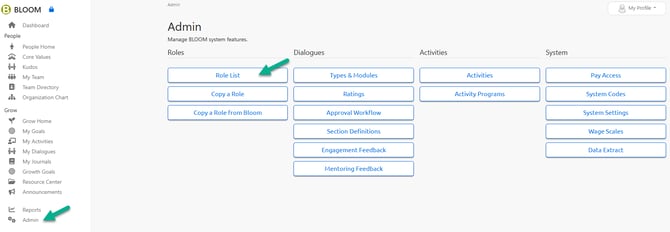
1. Click the ADMIN left navigation link. Then Click on ROLE LIST
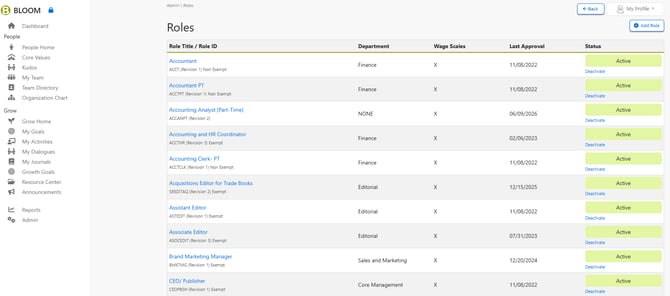
2. Click on the Role which you want to change.
3. Here you will see the previous Role Revisions and the current ACTIVE version.
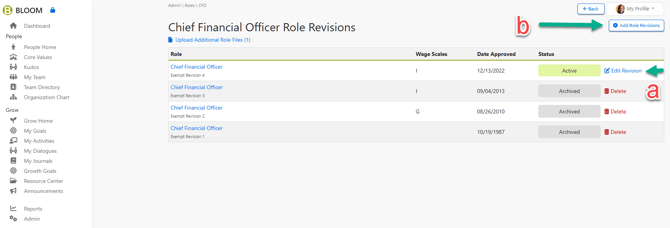
Click the corresponding links as indicated below.
a) Decide if you want to Edit the current ACTIVE Role.
-
The current version will open for you to revise. Click UPDATE on each page.
OR
b) Create a new Role Revision in order to archive the current version.
-
Use this when significant changes are needed, and you want the version to remain in the historical file for employees to access in their Role History for future access.
-
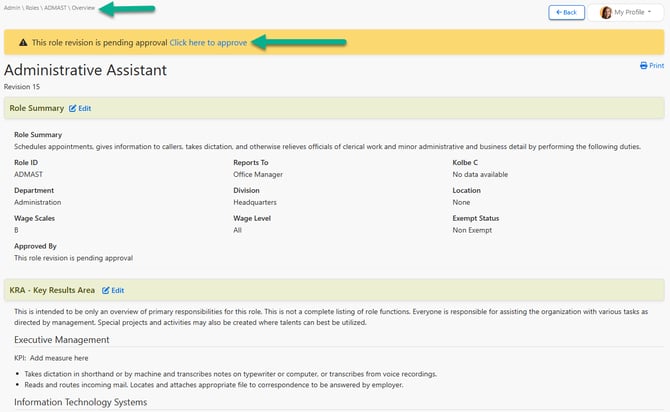
After all sections are UPDATED, HR will need to approve the new PENDING revision.
- HR APPROVES the new PENDING version by clicking the "Click here to approve" link on the OVERVIEW page of for the ROLE
- When approved, the new Role Profile will be available for Managers to ACCEPT the new changes in any open Dialogue. Future new Dialogues will automatically import the new changes.